
In ADF and Synapse Pipelines, there are 4 activity results:
- UponSuccess
- UponFailure
- UponCompletion
- UponSkip
The most important of these is the UponSkip result. Let me explain why.
Generally I have found everyone understands the top 3, and from a flow control standpoint, how to use them as they are pretty intuitive. That is until they want to build a single set of error handling logic and want it to trigger if any of a number of activities in the pipeline fail. Intuitively they connect the UponFailure from each of the activities they want to ‘catch’ the errors of, to the single error handling activity. Seems sensible, OnSuccess move to the next step, OnFailure go to the error handling activity. However, they quickly find it does not work, despite an error occurring on 1 of the activities, the error handling does not trigger.
So, why does this occur? There is a simple answer, but it is not intuitive. Lets go through what the the activity results are, and how they work.
While they are results, what they are not is flows or triggers. The results are actually dependencies, so we need to stop thinking of them in the context of the activity that creates them, and start thinking of them in the context of the activity they feed into.
With our new dependency mindset, lets revisit the above example, where there are many activities that we want to ‘catch’ when they error. Lets start with the error handling as this is what the UponError activaties feed into. This has many UponError results feeding it. As mentioned these are actually dependencies, and while you might assume they are a logical OR, as they are all dependencies they are in fact a logical AND. What this means is for the error handling to run, all the dependencies must be met, therefore all the activities with UponError results going into the error handling, must result in an error.
If you have UponSuccess dependencies linked to followup activities, that means if a prior step fails, the dependency wont be met, which means the next step cannot run at all, or to put it another way, cannot succeed OR fail. If it cannot fail, it will never trigger the UponFail that the error handling needs for it’s logical AND. If you saw this in the diagram it would just look like the pipeline stops after the first fail, nothing else is run.
You may already have given up and are thinking, like many, I will just copy the error handling so that for each UponError I want to catch there is a separate error handling flow. You might even be thinking that you will create a reusable error handling pipeline, and therefore you can just have a separate trigger for that for each UponError. This will work. I have seen this lots of times. It’s intuitive and easy to follow, but it is only required because there is a lack of knowledge of UponSkip, or more specifically, when an Activity is skipped.
Where does UponSkip come into this?
This would be a whole lot easier if every activity showed an icon for the result. We get an icon for Success (green tick) and Fail (red cross), and I suppose Completion is implicit (either a red cross or green tick), but there is no icon (a grey curved arrow?) for Skipping an activity. So when is an activity skipped, or more importantly, when will an UponSkip result trigger?
Key takeaway: An activity is skipped if it’s dependencies are not met. Conversely, an activity only runs if it’s dependencies are met. An activity either runs, or it is skipped.
So, how does this change how we build our pipelines?
When we think about the success path, nothing really changes. Assuming sequential activities, we setup UponSuccess dependencies and when an activity succeeds the next activity is triggered, because its dependency is met.
We have to think differently when we want to manage errors. There is a good article from Microsoft that, with our new understanding of dependencies and UponSkip, shows some of what we can do:
Pipeline Logic 3: Error Handling and Try Catch
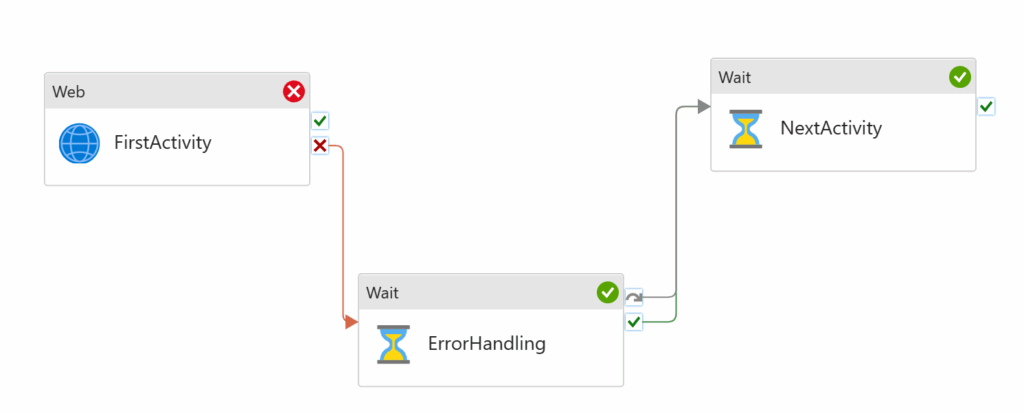
In the above diagram, the first activity fails. The ErrorHandling dependency of UponFailure is met, therefore it runs successfully. The NextActivity dependency of UponSuccess is met, so that also runs. Hence the red cross followed by 2 green ticks.
Some may look at this an ask, “what if the first activity succeeds?”.
Based on what we now know, nothing happens because it succeeds, because nothing is dependent on it succeeding. Because the ErrorHandling activity is dependant on the UponFailure of the the FirstActivity, it’s dependencies are not met, therefore it is skipped. The final NextActivity has its UponSkip dependency met, therefore it runs.
More concisely, in the above diagram, if the FirstActivity succeeds, the ErrorHandling is skipped and the NextActivity runs.
This is counter intuitive to many because there is no UponSuccess line from the FirstActivity, so if we thought of it as a flow, on succeeding nothing else runs, but when we think of it in dependencies, it makes sense. It is also worth pointing out that if we only wanted the NextActivity to trigger if the FirstActivity succeeds, then we would need to create that dependency as a the moment it will always run regardless of if the FirstActivity succeeds or fails.
UponSkip – Critical for error handling
“But what if there were steps before the FirstActivity that we also wanted our ErrorHandler step to trigger on?”
Lets assume that we added to the above diagram, 2 more activities before the ones in the diagram. These activities have a single result line creating UponSuccess dependencies on the follow-up activities.
If they all succeed, each activity runs, the ErrorHandling would be skipped, and the final NextActivity would run. This is exactly what you would want.
As it stands, if either of our 2 new activities failed, nothing more would run, no error handling, nothing. This is because none of the following activity dependencies would be met as they are all reliant on UponSuccess of the previous activity. At this point you are probably thinking, because it is so ingrained, that we need to add some UponFailure results and dependencies. For our current use case, this would be a mistake. What we need to add is a single UponSkip dependency to the ErrorHandling activity from the FirstActivity.
I’ll repeat, we dont add any UponFailure results, we only add a single UponSkip between the ErrorHandling activity and the activity before it.
We have to remember our keypoint from above. An activity is skipped if its dependencies are not met. If any of the prior activities fail, the UponSuccess dependency of the following activities are not met, therefore they are skipped, and this cascades, everything being skipped. This only stops along the ‘chain’ as our UponSkip dependency of our ErrorHandling activity is met so that runs. Perfect!
We still need the UponFailure of the last activity before the ErrorHandling step as if everything but that one succeeds, it wont be skipped as it instead fails therefore that needs to be an UponSkip OR UponFailure dependency on the ErrorHandling activity.
TLDR
- Activity results are not flows, they create dependencies for the linked activity.
- Dependencies from multiple activities are treated as logical AND.
- Multiple dependencies from the same activity are treated as logical OR (as there can only ever be 1 result).
- Any activity where it’s dependencies are not met is skipped, and can then be used to meet an UponSkip dependency.
I struggled to find any useful articles covering this, even directly from Microsoft. Hopefully this has helped explain why understanding UponSkip and when an activity is skipped is so important, as it can reduce work, especially repeating part of your pipeline error handling… and if you don’t have error handling in your pipelines in the first place… well…